
Change/Customize Bullet List Style with Image Hover Effect in Blogger
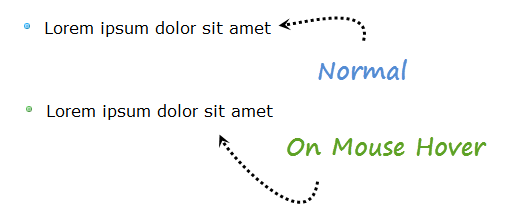
As you know today, in this tutorial we will make some some fun with bullet list style. We will add two small rounded bullets colored in blue on green. In normal bullet will stay in blue color and on mouse hover it turns into green,this mouse hover effect attracts anyone and gives your article professional look. To add this effect you just have to put some CSS code in your template, Let’s start now.

How To Customize Bullet List Style in Blogger
- Go to Blogger Dashboard > Design > Edit HTML.
- Download a copy of your template.
- Now find ]]></b:skin> tag by pressing CTRL+F
- Paste below code just above of ]]></b:skin> tag inside your blogger template.
.post ul { list-style: none;}
.post ul li { line-height: 1.4em; background: transparent url(http://1.bp.blogspot.com/-15tyJnOcQFY/T6JKYobSC3I/AAAAAAAABhM/sB5M5iGJB9k/s1600/blue-bullet-icon.png) no-repeat scroll 0 5px; margin: 0.3em 0; padding: 0 0 0.8em 20px;}
.post ul li:hover { background: transparent url(http://2.bp.blogspot.com/-CdnDoCYg3rA/T6JKZQSDCzI/AAAAAAAABhU/0BnItZGAnls/s1600/green-bullet-icon.png) no-repeat scroll 0px 5px;}
Possible Customizations:
- The bullet image can be aligned horizontally with the text by increasing or decreasing the value 5px. If you are editing code then both values highlighted in yellow color should be same.
- You can replace the URL’S of image with your own images as you wish.
6. That’s it, You are done.
See Also Another Stylish Widget
- Stylish Contact Form for Blogger! Add to Static Page.
- Stylish Popup Subscription Box for Blogger.
- WordPress Like Floating Social Sharing Counter Buttons for Blogger.
Conclusion:
Contents
